Latest Post

Latest POSTS

Introduction to C

C is a general purpose, structured programming language. Its instructions consist of terms that resemble algebraic expressions, augmented by certain English keywords such as if, else, for, do and while. In this respect it resembles high level structured programming languages such as Pascal and FORTRAN. C also contains additional features, that allow it to be used at a lower level, thus bridging the gap between machine language and high level language. This flexibility allows C to be used for systems programming as well as for applications programming. Therefore C is called a middle level language.  
 
C is characterized by the ability to write very concise source programs, due in part to the large number of operators included within the language. It has a relatively small instruction set, though actual implementations include extensive library functions which enhance the basic instructions. C encourages users to create their own library fuctions.

An important characteristic of C is that its programs are highly portable. The reason for this is that C relegates most computer dependent features to its library functions. Thus, every version of C is accompanied by its own set of library functions which are relatively standardized. Therefore most C programs can be processed on many different computers with little or no alteration.

History of C:

C was developed in the 1970′s by Dennis Ritchie at Bell Telephone Laboratories,Inc. (now a part of AT&T). It is an outgrowth of two earlier languages, called BCPL and B, which were also developed at Bell Laboratories.

The Combined Programming Language(CPL) was developed at Cambridge University in 1963 with the goal of developing a common programming language which can be used to solve different types of problems on various hardware platforms. However it turned out to be too complex, hard to learn and difficult to implement. Subsequently in 1967, a subset of CPL, Basic CPL(BCPL) was developed by Martin Richards incorporating only the essential features. However it was not found to be sufficiently powerful. Around the same time another subset of CPL, a language called B was developed by Ken Thompson at Bell Labs. However it also turned out to be insufficient . Then, in 1972, Dennis Ritchie at Bell Labs developed the C language incorporating the best features of both BCPL and B.

C was largely confined to use within Bell Labs until 1978, when Brian Kernighan and Ritchie published a definitive description of the language . The Kerninghan and Ritchie description of C is commonly referred to as ‘K &R C’.

Following the publication of ‘K&R C’,computer professionals, impressed with C’s many desirable features, began to promote the use of C. By the mid 1980′s the popularity of C had become widespread-many c compilers and interpreters had been written for computers of all sizes and many commercial application programs had been developed. Moreover, many commercial software products that had originally been written in other languages were rewritten in C in order to take advantage of its efficiency and portability.

Early commercial implementations of C differed a little from Kerninghan and Ritchie’s original description, resulting in minor incompatibilities between different implementations. As a result, the American National Standards Institute(ANSI committee X3J11)  developed a standardized definition of C. Virtually all commercial compilers and interpreters adhere to the ANSI standard. Many provide additional features of their own.

C and Systems Programming:

There are several features of C, which make it suitable for systems programming. They are as follows:
  • C is a machine independent and highly portable language.
  • It is easy to learn; it has only 28 keywords.
  • It has a comprehensive set of operators to tackle business as well as scientific applications with ease.
  • Users can create their own functions and add to the C library to perform a variety of tasks.
  • C language allows the manipulation of bits, bytes and addresses.
  • It has a large library of functions.
  • C operates on the same data types as the computer, so the codes generated are fast and efficient.
Structure of a C Program:

Every C program consists of one or more modules called functions. One of the functions must be called main. The program will always begin by executing the main function, which may access other functions. The main function is normally,but not necessarily located at the beginning of the program. The group of statements within main( ) are executed sequentially. When the closing brace of main( ) is encountered, program execution stops and control is returned to the operating system.
Any other function defintions must be defined separately, either ahead or after main( ). Each function must contain:
1. A function heading, which consists of the function name, followed by an optional list of arguments, enclosed in parantheses.
2. A return type written before the function name. It denotes the type of data that the function will return to the program.
3. A list of argument declarations, if arguments are included in the heading.
4. A compound statement, which comprises the remainder of the function.
The arguments(also called parameters) are symbols that represent information being passed between the function and other parts of the program.
Each compound statement is enclosed between a pair of braces{ }. The braces may contain one or more elementary statements (called expression statements) and other compound statements. Thus compound statements may be nested one within another. Each expression statement must end with a semicolon(;).
Comments (remarks) may appear anywhere within a program as long as they are enclosed within the delimiters /* and */. Comments are used for documentation and are useful in identifying the program’s principal features or in explaining the underlying logic of various program features.

Components of C Language:

There are five main components of the C Language:-
1. The character set: C uses the uppercase letters A to Z, the lowercase letters a to z, the digits 0 to 9 and certain special characters as building blocks to form basic program elements(e. g. constants, variables, expressions, statements etc. ).

2. Data Types: The C language is designed to handle five primary data types, namely, character, integer, float, double and void; and secondary data types like array, pointer, structure, union and enum. 

3. Constants: A constant is a fixed value entity that does not change its value throughout program execution.

4. Variables: A variable is an entity whose value can change during program execution. They are used for storing input data or to store values generated as a result of processing.

5. Keywords: Keywords are reserved words which have been assigned specific meanings in the C language. Keywords cannot be used as variable names.
The components of C language will be discussed in greater detail in the following articles. This section gives only a brief introduction to the components of C.

Embedded operating system

An embedded operating system is an operating system for embedded computer systems. These operating systems are designed to be compact, efficient at resource usage, and reliable, forsaking many functions that non-embedded computer operating systems provide, and which may not be used by the specialized applications they run. They are frequently also referred to as real-time operating systems, and the term RTOS is often used as a synonym for embedded operating system.

Usually, the hardware running an embedded operating system is very limited in resources such as RAM and ROM therefore systems made for embedded hardware tend to be very specific, which means that due to the available resources (low if compared to non-embedded systems) these systems are created to cover specific tasks or scopes. In order to get advantage of the processing power of the main (or only) CPU, system creators often write them in assembly. This machine efficient language "squeezes" the potentiality in terms of speed and determinism, which means maximizing the responsiveness of the operating system. Though, it not an absolute rule that all embedded operating systems are written in assembly language, as many of them are written in more portable languages, like C.

An important difference between most embedded operating systems and desktop operating systems is that the application, including the operating system, is usually statically linked together into a single executable image. Unlike a desktop operating system, the embedded operating system does not load and execute applications. This means that the system is only able to run a single application.

An embedded operating system is an operating system for embedded computer systems. These operating systems are designed to be compact, efficient, and reliable, forsaking many functions that non-embedded computer operating systems provide, and which may not be used by the specialized applications they run. They are frequently also real-time operating systems, and the term RTOS is often used as a synonym for embedded operating system.

An important difference between most embedded operating systems and desktop operating systems is that the application, including the operating system, is usually statically linked together into a single executable image. Unlike a desktop operating system, the embedded operating system does not load and execute applications. This means that the system is only able to run a single application.

Time Sharing Operating System

A time sharing system allows many users to share the computer resources simultaneously. In other words, time sharing refers to the allocation of computer resources in time slots to several programs simultaneously. For example a mainframe computer that has many users logged on to it. Each user uses the resources of the mainframe -i.e. memory, CPU etc. The users feel that they are exclusive user of the CPU, even though this is not possible with one CPU i.e. shared among different users.

The time sharing systems were developed to provide an interactive use of the computer system. A time shared system uses CPU scheduling and multiprogramming to provide each user with a small portion of a time-shared computer. It allows many users to share the computer resources simultaneously. As the system switches rapidly from one user to the other, a short time slot is given to each user for their executions.
The time sharing system provides the direct access to a large number of users where CPU time is divided among all the users on scheduled basis. The OS allocates a set of time to each user. When this time is expired, it passes control to the next user on the system. The time allowed is extremely small and the users are given the impression that they each have their own CPU and they are the sole owner of the CPU. This short period of time during that a user gets attention of the CPU; is known as a time slice or a quantum. 

The main disadvantage of multi programmed batch system is:

1. The user can interract with the job when its executing the user must setup the control cards to handle all possiable outcomes.

2. Another difficulty is that program must be debug statically from snapshop dumps. A programmer cannot modified program has it execute to study its behaviour.

Time sharing or multi tasking is logical expansion of multi prograamming. Multiple jobs are executed by the CPU switching between them. But the Switches occur so frequently that uses may interact with each program while it is running.

An intractive or hand on computer syste provides on time communication between the user and the system. The user given instruction to the use or to a program directly and receives an immediate response.

Time sharing where develope to provide interactive use of a computer system at a reasonable cost. A time shared operating system uses CPU scheduling and multi programming to provide each user with a small portion of a time shared computer.

A time shared operating system allows the many users to share the computer simultaneoualy. Since each action or command in a time shared system tends to be needed for each user.

The main disadvantage of Time sharing system is very difficult and expensive to built. Time sharing provids and on-line file system. The file system resides on a collection of disk. Hence memory management must be provided. It provides a mechanism for concurrent execution, which requires CPU scheduling schemes to orderly execution. The system should provides job synchronization and communication and that jobs should not gets struck in a dead lock, forever waiting for one another.

Multi programming and Time sharing are the control themes of modern operating system.


In above figure the user 5 is active but user 1, user 2, user 3, and user 4 are in waiting state whereas user 6 is in ready status.
 
As soon as the time slice of user 5 is completed, the control moves on to the next ready user i.e. user 6. In this state user 2, user 3, user 4, and user 5 are in waiting state and user 1 is in ready state. The process continues in the same way and so on.
 
The time-shared systems are more complex than the multiprogramming systems. In time-shared systems multiple processes are managed simultaneously which requires an adequate management of main memory so that the processes can be swapped in or swapped out within a short time.

Real Time Operating System

  • A real-time operating system (RTOS) is an operating system (OS) intended to serve real-time application requests.
  • A key characteristic of a RTOS is the level of its consistency concerning the amount of time it takes to accept and complete an application's task; the variability is jitter. A hard real-time operating system has less jitter than a soft real-time operating system. The chief design goal is not high throughput, but rather a guarantee of a soft or hard performance category. A RTOS that can usually or generally meet a deadline is a soft real-time OS, but if it can meet a deadline deterministically it is a hard real-time OS.
  • A real-time OS has an advanced algorithm for scheduling. Scheduler flexibility enables a wider, computer-system orchestration of process priorities, but a real-time OS is more frequently dedicated to a narrow set of applications. Key factors in a real-time OS are minimal interrupt latency and minimal thread switching latency, but a real-time OS is valued more for how quickly or how predictably it can respond than for the amount of work it can perform in a given period of time.

Basics of Operating Systems

Definition:

Operating Systems are resource managers. The main resource is computer hardware in the form of processors, storage, input/output devices, communication devices, and data. Some of the operating system functions are: implementing the user interface, sharing hardware among users, allowing users to share data among themselves, preventing users from interfering with one another, scheduling resources among users, facilitating input/output, recovering from errors, accounting for resource usage, facilitating parallel operations, organizing data for secure and rapid access, and handling network communications.

How an Operating System works?
 
Operating systems control different computer processes, such as running a spreadsheet program or accessing information from the computer's memory. One important process is interpreting commands, enabling the user to communicate with the computer. Some command interpreters are text oriented, requiring commands to be typed in or to be selected via function keys on a keyboard. Other command interpreters use graphics and let the user communicate by pointing and clicking on an icon, an on-screen picture that represents a specific command. Beginners generally find graphically oriented interpreters easier to use, but many experienced computer users prefer text-oriented command interpreters.
Operating systems are either single-tasking or multitasking. The more primitive single-tasking operating systems can run only one process at a time. For instance, when the computer is printing a document, it cannot start another process or respond to new commands until the printing is completed.
All modern operating systems are multitasking and can run several processes simultaneously. In most computers, however, there is only one central processing unit (CPU; the computational and control unit of the computer), so a multitasking OS creates the illusion of several processes running simultaneously on the CPU. The most common mechanism used to create this illusion is time-slice multitasking, whereby each process is run individually for a fixed period of time. If the process is not completed within the allotted time, it is suspended and another process is run. This exchanging of processes is called context switching. The OS performs the “bookkeeping” that preserves a suspended process. It also has a mechanism, called a scheduler, that determines which process will be run next. The scheduler runs short processes quickly to minimize perceptible delay. The processes appear to run simultaneously because the user's sense of time is much slower than the processing speed of the computer.
 
 Software Program:
An Operating System is a software program or set of programs that mediate access between physical devices (such as a keyboard, mouse, monitor, disk drive or network connection) and application programs (such as a word processor, World-Wide Web browser or electronic mail client).

 Device Manager:
The operating system provides a set of APIs to the applications for accessing input/output (I/O) devices in a consistent and relatively simple manner regardless of the specifics of the underlying hardwar 

 Security:
Operating systems provide security by preventing unauthorized access to the computer's resources. Many operating systems also prevent users of a computer from accidentally or intentionally interfering with each other

 Slicer :
Modern operating systems provide the capability of running multiple application programs simultaneously, which is referred to as multiprogrammingThe operating system can share the CPU among the processes by using a technique known as time slicing

 Resource Allocator:
The operating system is responsible for sharing the memory among the currently running processes 

 Coordinator:
Manages all resources and settles conflicting requests for resources and also prevent errors and improper use of the computer

 Facilitator :
Provides facilities that everyone needs standard Libraries, Windowing systems which make application programming easier, faster, less error-prone

 Examples of OS:
UNIX , LINUX,Windows NT,Windows 95/98,Netware

Generations of Operating systems

Operating systems, like computer hardware, have undergone a series of revolutionary changes called generations. In computer hardware, generations have been marked by major advances in component  from vacuum tubes (first generation), to transistors (second generation), to integrated circuitry (third generation), to large-scale and very large-scale integrated circuitry (forth generation). The successive hardware generations have each been accompanied by dramatic reductions in costs, size, heat emission, and energy consumption, and by dramatic increases in speed and storage capacity.
  • The 1940's - First Generations
  • The 1950's - Second Generation
  • The 1960's - Third Generation
  • Fourth Generation (1971-Present) Microprocessors
  • Fifth Generation (Present and Beyond) Artificial Intelligence

The 1940's - First Generations

The earliest electronic digital computers had no operating systems. Machines of the time were so primitive that programs were often entered one bit at time on rows of mechanical switches (plug boards). Programming languages were unknown (not even assembly languages). Operating systems were unheard of .

The 1950's - Second Generation

By the early 1950's, the routine had improved somewhat with the introduction of punch cards. The General Motors Research Laboratories implemented the first operating systems in early 1950's for their IBM 701. The system of the 50's generally ran one job at a time. These were called single-stream batch processing systems because programs and data were submitted in groups or batches.

The 1960's - Third Generation

The systems of the 1960's were also batch processing systems, but they were able to take better advantage of the computer's resources by running several jobs at once. So operating systems designers developed the concept of multiprogramming in which several jobs are in main memory at once; a processor is switched from job to job as needed to keep several jobs advancing while keeping the peripheral devices in use.
For example, on the system with no multiprogramming, when the current job paused to wait for other I/O operation to complete, the CPU simply sat idle until the I/O finished. The solution for this problem that evolved was to partition memory into several pieces, with a different job in each partition. While one job was waiting for I/O to complete, another job could be using the CPU.
Another major feature in third-generation operating system was the technique called spooling (simultaneous peripheral operations on line). In spooling, a high-speed device like a disk interposed between a running program and a low-speed device involved with the program in input/output. Instead of writing directly to a printer, for example, outputs are written to the disk. Programs can run to completion faster, and other programs can be initiated sooner when the printer becomes available, the outputs may be printed.
Note that spooling technique is much like thread being spun to a spool so that it may be later be unwound as needed.
Another feature present in this generation was time-sharing technique, a variant of multiprogramming technique, in which each user has an on-line (i.e., directly connected) terminal. Because the user is present and interacting with the computer, the computer system must respond quickly to user requests, otherwise user productivity could suffer. Time-sharing systems were developed to multiprogramming large number of simultaneous interactive users.

Fourth Generation

With the development of LSI (Large Scale Integration) circuits, chips, operating system entered in the system entered in the personal computer and the workstation age. Microprocessor technology evolved to the point that it become possible to build desktop computers as powerful as the mainframes of the 1970s. Two operating systems have dominated the personal computer scene: MS-DOS, written by Microsoft, Inc. for the IBM PC and other machines using the Intel 8088 CPU and its successors, and UNIX, which is dominant on the large personal computers using the Motorola 6899 CPU family.

Chipsets

  • A number of integrated circuits designed to perform one or more related functions. For example, one chipset may provide the basic functions of a modem while another provides the CPU functions for a computer. 
  • Newer chipsets generally include functions provided by two or more older chipsets. In some cases, older chipsets that required two or more physical chips can be replaced with a chipset on one chip.  
  • The term is often used to refer to the core functionality of a motherboard.  


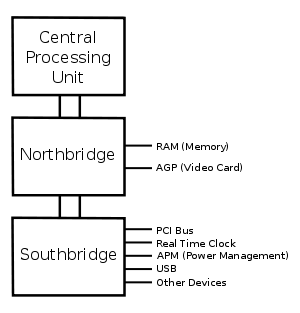
Diagram of the motherboard chipset

NORTHBRIDGE
  • The northbridge, also known as a memory controller hub (MCH) or an integrated memory controller (IMC) in Intel systems (AMD, VIA, SiS and others usually use 'northbridge'), is one of the two chips in the core logic chipset on a PC motherboard, the other being the southbridge.
  • Separating the chipset into the northbridge and southbridge is common, although there are rare instances where these two chips have been combined onto one die when design complexity and fabrication processes permit it.,
SOUTHBRIDGE
  • The Southbridge, also known as an I/O Controller Hub (ICH) or a Platform Controller Hub (PCH) in Intel systems (AMD, VIA, SiS and others usually use 'southbridge'), is a chip that implements the "slower" capabilities of the motherboard in a northbridge/southbridge chipset computer architecture.
  • The southbridge can usually be distinguished from the northbridge by not being directly connected to the CPU. Rather, the northbridge ties the southbridge to the CPU.
                                  explainpoin.blogspot.in
A typical north/southbridge layout

Chipset Characteristics

The characteristics of a chipset can be broken down into six categories: host, memory, interfaces, arbitration, south bridge support, and power management. Each of these categories defines and differentiates one chipset from another. The characteristics defined in each of these categories are as follows:

• Host This category defines the host processor to which the chipset is matched along with its bus voltage, usually GTL+ (Gunning Transceiver Logic Plus) or AGTL+ (Advanced Gunning Transceiver Logic Plus), and the number of processors the chipset will support.

• Memory This category defines the characteristics of the DRAM support included in the chipset, including the DRAM refresh technique supported, the amount of memory support (in megabits usually), the type of memory supported, and whether memory interleave, ECC (error correcting code), or parity is supported.
• Interfaces This category defines the type of PCI interface implemented and whether the chipset is AGP compliant, supports integrated graphics PIPE (pipelining), or SBA (side band addressing).

• Arbitration This category defines the method used by the chipset to arbitrate between different bus speeds and interfaces. The two most common arbitration methods are MTT (multi transaction timer) and DIA (dynamic intelligent arbiter).

• South bridge support All intel chipsets and most of the chipsets for all other manufacturers are two processor sets. In these sets the north bridge is the main chip and handles CPU and memory interfaces among other tasks, while the south bridge (or the second chip ) handles such things as the USB and IDE interfaces, the RTC (real time clock),and support for serial and parallel ports.

• Power management All intel chipsets support both the SMM (system management mode) and ACPI (advanced configuration and power interface power management standards).

Firewalls

A firewall is a set of related programs, located at a network gateway server, that protects the resources of a private network from users from other networks. (The term also implies the security policy that is used with the programs.) An enterprise with an intranet that allows its workers access to the wider Internet installs a firewall to prevent outsiders from accessing its own private data resources and for controlling what outside resources its own users have access to.

    Basically, a firewall, working closely with a router program, examines each network packet to determine whether to forward it toward its destination. A firewall also includes or works with a proxy server that makes network requests on behalf of workstation users. A firewall is often installed in a specially designated computer separate from the rest of the network so that no incoming request can get directly at private network resources.

   There are a number of firewall screening methods. A simple one is to screen requests to make sure they come from acceptable (previously identified) domain name and Internet Protocol addresses. For mobile users, firewalls allow remote access in to the private network by the use of secure log on procedures and authentication certificates.

A number of companies make firewall products. Features include logging and reporting, automatic alarms at given thresholds of attack, and a graphical user interface for controlling the firewall. Computer security borrows this term from firefighting, where it originated. In firefighting, a firewall is a barrier established to prevent the spread of fire.