Latest Post

Latest POSTS

Create Separate Contact Page in Blogger


Blogger launched it’s official version of the Contact Form Widget but, it works only on the Blogger Sidebar. If you don’t want to add the contact form to your Blog’s sidebar but want it to appear on a specific page, then this tutorial will help you out. I didn’t want the contact form to appear every where on my blog. So I have moved it to a separate Contact Me Page.

How to move the Blogger Contact Form to a separate Page


Follow the below steps to move the Contact Form to a separate page. If you would like to see a demo, you can check out my Contact page.
  1. First, add the Blogger Contact Form Widget to your sidebar. (We will hide the contact form later in this tutorial, but you have to add it) . My previous tutorial on adding a blogger contact form widget will help you out.
  2. Now create a new page in your blog

Copy the below contact form code block
 <div class="widget ContactForm" id="ContactForm1">  
 <div class="contact-form-widget">  
 <div class="form">  
 <form name="contact-form">  
 <div>  
 Your Name : </div>  
 <input class="contact-form-name" id="ContactForm1_contact-form-name" name="name" size="30" type="text" value="" />&nbsp;   
 <div>  
 Your Email: <i>(required)</i></div>  
 <input class="contact-form-email" id="ContactForm1_contact-form-email" name="email" size="30" type="text" value="" />&nbsp;   
 <div>  
 Your Message: <i>(required)</i></div>  
 <textarea class="contact-form-email-message" id="ContactForm1_contact-form-email-message" name="email-message" rows="5"></textarea>&nbsp; <input class="contact-form-button contact-form-button-submit" id="ContactForm1_contact-form-submit" type="button" value="Send" />   
 <div style="max-width: 450px; text-align: center; width: 100%;">  
 </div>  
 </form>  
 </div>  
 </div>  
 </div>  
 </div>  
 </div>  

While creating the Page, you have to switch to the HTML mode as shown in the image below. Then paste the above code into the post editor, disable the comments and publish your page.


Now go to Template > Edit HTML
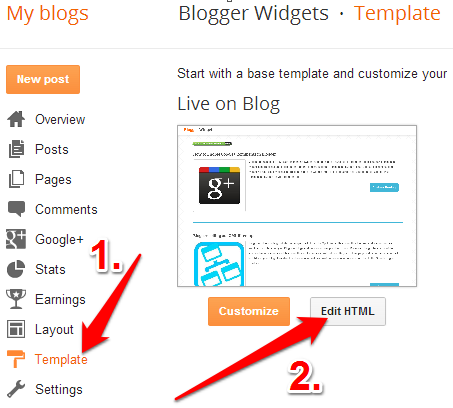
 
and Jump to the Contact Form Code and expand with widget code


and then expand the main b : includable


Now delete the code highlighted below


so that it ends up like


 And Add CSS coding

Past coding

 .contact-form-widget {  
 width: 500px;  
 max-width: 100%;  
 margin: 0 auto;  
 padding: 10px;  
 background: #F8F8F8;  
 color: #000;  
 font-family: Goudy Old Style;  
 font-size:18px;  
 border: 1px solid #C1C1C1;  
 box-shadow: 0 1px 4px rgba(0, 0, 0, 0.25);  
 border-radius: 10px;  
 }  
 /* Fields and submit button */  
 .contact-form-name {  
 background: white;  
 border: 1px solid #DDD;  
 border-radius: 5px;  
 box-shadow: 0 0 5px #DDD inset;  
 color: #666;  
 outline: none;  
 height:25px;  
 width: 300px;  
 }  
 .contact-form-name:hover{  
 background: white;  
 border: 1px solid #ffa853;  
 border-radius: 5px;  
 box-shadow: 0 0 5px 3px #ffa853;  
 color: #000;  
 outline: none;  
 }  
 .contact-form-name:focus{  
 outline: none;  
 border: 1px solid #7bc1f7;  
 box-shadow: 0px 0px 8px #7bc1f7;  
 -moz-box-shadow: 0px 0px 8px #7bc1f7;  
 -webkit-box-shadow: 0px 0px 8px #7bc1f7;  
 }  
 .contact-form-email {  
 background: white;  
 border: 1px solid #DDD;  
 border-radius: 5px;  
 box-shadow: 0 0 5px #DDD inset;  
 color: #666;  
 outline: none;  
 height:25px;  
 width: 300px;  
 }  
 .contact-form-email:hover {  
 background: white;  
 border: 1px solid #ffa853;  
 border-radius: 5px;  
 box-shadow: 0 0 5px 3px #ffa853;  
 color: #000;  
 outline: none;  
 }  
 .contact-form-email:Focus{  
 outline: none;  
 border: 1px solid #7bc1f7;  
 box-shadow: 0px 0px 8px #7bc1f7;  
 -moz-box-shadow: 0px 0px 8px #7bc1f7;  
 -webkit-box-shadow: 0px 0px 8px #7bc1f7;  
 }  
 .contact-form-email-message {  
 width: 100%;  
 max-width: 100%;  
 margin-bottom: 10px;  
 background: white;  
 border: 1px solid #DDD;  
 border-radius: 5px;  
 box-shadow: 0 0 5px #DDD inset;  
 color: #666;  
 outline: none;  
 }  
 .contact-form-email-message:hover {  
 background: white;  
 border: 1px solid #ffa853;  
 border-radius: 5px;  
 box-shadow: 0 0 5px 3px #ffa853;  
 color: #000;  
 outline: none;  
 }  
 .contact-form-email-message:focus {  
 outline: none;  
 border: 1px solid #7bc1f7;  
 box-shadow: 0px 0px 8px #7bc1f7;  
 -moz-box-shadow: 0px 0px 8px #7bc1f7;  
 -webkit-box-shadow: 0px 0px 8px #7bc1f7;  
 }  
 /* Submit button style */  
 .contact-form-button-submit {  
 border-color: #C1C1C1;  
 background: #E3E3E3;  
 color: #585858;  
 width: 20%;  
 max-width: 20%;  
 margin-bottom: 10px;  
 }  
 /* Submit button on mouseover */  
 .contact-form-button-submit:hover{  
 background: #4C8EF9;  
 color: #ffffff;  
 border: 1px solid #FAFAFA;  
 }  
  1. Now we have prevented the Contact Form Widget from appearing anywhere on the sidebar but have kept the widget registered.Make sure that you don't remove the widget from the Layout Page.
  2. Save the Template and it’s done.You now have a separate contact page on your Blogger blog.
  3.  
     Happy Blogging!

Concepts of Object Oriented Programming

The Object Oriented Programming is a  type of programming in which programmers define not only the data type of a data structure, but also the types of operations (functions) that can be applied to the data structure. In this way, the data structure becomes an object that includes both data and functions. In addition, programmers can create relationships between one object and another.

The concepts used in OOPs are
  • Objects
  • Classes
  • Data Abstraction and Data Encapsulation
  • Inheritance
  • Polymorphism
  • Dynamic Binding
  • Message Passing
Objetcs
  • Object is defined as the basic run time entity that contains data and its related methods.
  • Object may be a person, place or any item that the program has to handle.
  • The methods are operating on the data.
  • The objects may be either physical or logical.
  • When a program is executed, the objects interact by sending messages to one another.
Classes
  • A class is defined as a collection of Objects with same type of data and functions.
  • Once a class is defined we can create number of objects belonging to that class.
  • Class is a user defined data type
Data Abstraction
  • Abstraction refers to the act of representing essential features without including the back ground details.
  • Also by the feature of data abstraction it is possible to create user defined data types and thus increase the power of programming language
Data encapsulation
  • Data Encapsulation is the process of combining data and functions into a single unit called class.
  • By this method one cannot access the data directly.
  • Data is accessible only through the functions present inside the class.
  • Data Encapsulation provides data hiding.
Inheritance
  • Inheritance is a process of deriving new classes from existing classes.
  • The derived classes contain all attributes and functions of existing classes plus its own attributes and functions.
  • Existing class is called as Base class or Super class and inherited class is called as Derived class or Sub class.
  • The inheritance concept gives data reusability
Polymorphism
  • Polymorphism means the ability to take more than one forms.
  • An operation may exhibit different behavior in different instances.
  • The behavior depends on the type of data used in the operation.
Dynamic Binding
  • Binding refers to the connection between the function call and the corresponding function code to be executed.
  • Dynamic binding means code associated with the given procedure call is not known until run time.
Message Passing
  • Message passing is a process of sending request to execute a function for an object.
  • Message passing involves specifying the name of the object, name of the method and the information to be sent. 
Object Oriented Programming Concepts - Presentations:


Software Configuration Management

Changes are inevitable when software is built. A primary goal of software engineering is to improve the ease with which changes can be made to software. Configuration management is all about change control.
              Every software engineer has to be concerned with how changes made to work products are tracked and propagated throughout a project.
                          To ensure that quality is maintained the change process must be audited. A Software Configuration Management (SCM) Plan defines the strategy to be used for change management.

Risk Classification

The key purpose of classifying risk is to get a collective viewpoint on a group of factors. These are the types of factors which will help project managers to identify the group that contributes the maximum risk.
A best and most scientific way of approaching risks is to classify them based on risk attributes. Risk classification is considered as an economical way of analyzing risks and their causes by grouping similar risks together into classes .

Software risks could be classified as internal or external. Those risks that come from risk factors within the organization are called internal risks whereas the external risks come from out of the organization and are difficult to control. Internal risks are project risks, process risks, and product risks. External risks are generally business with the vendor, technical risks, customers ,satisfaction, political stability and so on.

Some of most important risks in software engineering project are categorized as,

  •  Software requirement risks
  • Software cost risks
  • Software scheduling risk
  • Software quality risks

SOFTWARE REQUIREMENT RISKS

1. Lack of analysis for change of requirements.
2. Change extension of requirements
3. Lack of report for requirements
4. Poor definition of requirements
5. Ambiguity of requirements
7. Change of requirements
8. Inadequate of requirements
9. Impossible requirements
10. Invalid requirements

SOFTWARE COST RISKS

1. Lack of good estimation in projects
2. Unrealistic schedule
3. The hardware does not work well
4. Human errors
5. Lack of testing
6. Lack of monitoring
7. Complexity of architecture
8. Large size of architecture
9. Extension of requirements change
10. The tools does not work well
11. Personnel change, Management change, technology change, and environment change
12. Lack of reassessment of management cycle

SOFTWARE SCHEDULING RISKS

1. Inadequate budget
2 . Change of requirements and extension of requirements
3. Human errors
4. Inadequate knowledge about tools and techniques
5. Long-term training for personnel
6 .Lack of employment of manager experience
7. Lack of enough skill
8. Lack of good estimation in projects

SOFTWARE QUALITY RISKS

1. Inadequate documentation
2. Lack of project standard
3. Lack of design documentation
4. Inadequate budget
5. Human errors
6. Unrealistic schedule
7. Extension of requirements change
8. Poor definition of requirements
9. Lack of enough skill
10. Lack of testing and good estimation in projects
11. In adequate knowledge about techniques, programming language, tools, and so on.

Difference between AC and DC

  • The difference between AC and DC is that AC is an alternating current (the amount of electrons) that flows in both directions and DC is direct current that flows in only one direction; the product that is flowing being electrons. AC power is what fuels our homes. The wires outside of our house are connected at two ends to AC generators.
 
  • DC is found in batteries and solar cells. Both AC and DC employ magnets to repel electrons. Electrons are negatively charged particles that are one of 3 components that make up an atom. Negative charges will repel negative charges and positive charges will repel positive charges, so one only needs to introduce a negatively charged item next to electrons to force them to move in the opposite direction.
 
  • Likewise, you can attract electrons by introducing something that is positively charged into their environment drawing the electrons to it. This property of electrons is what allows for AC power to work; that is, they switch directions constantly. The picture to the left is a demonstration of AC power at work. The constant switching of directions is evident in the dotted appearance of the light lines.
 
  • DC power was invented by Thomas Edison and first used to power our homes in the late 1800’s.
 
  • Its main drawback being that in order to receive DC power from a generating station, your home had to be located within a one mile radius of the station.
 
  • DC power degrades as it moves away from its generating source; the further away, the less power. In addition, it is difficult to convert very high power DC current into the lower power current needed in our homes.
 
  • Nikola Tesla discovered AC and sold his design to Westinghouse. AC power degrades very little over 100’s of kilometers.
 
  • When the power reaches an electrical pole outside our homes, a transformer converts to high voltage (the amount of energy carried with the electrons) to the low voltage needed to fuel our appliances.
 
  • To convert AC to DC, a device needs an item called a rectifier. Many monorail systems use DC power. In addition, if you have a portable stereo, you may notice a button on the back that can switch from AC to DC; this means that you can power your device by plugging it in (AC) or by using batteries (DC).
 

Introduction to C

C is a general purpose, structured programming language. Its instructions consist of terms that resemble algebraic expressions, augmented by certain English keywords such as if, else, for, do and while. In this respect it resembles high level structured programming languages such as Pascal and FORTRAN. C also contains additional features, that allow it to be used at a lower level, thus bridging the gap between machine language and high level language. This flexibility allows C to be used for systems programming as well as for applications programming. Therefore C is called a middle level language.  
 
C is characterized by the ability to write very concise source programs, due in part to the large number of operators included within the language. It has a relatively small instruction set, though actual implementations include extensive library functions which enhance the basic instructions. C encourages users to create their own library fuctions.

An important characteristic of C is that its programs are highly portable. The reason for this is that C relegates most computer dependent features to its library functions. Thus, every version of C is accompanied by its own set of library functions which are relatively standardized. Therefore most C programs can be processed on many different computers with little or no alteration.

History of C:

C was developed in the 1970′s by Dennis Ritchie at Bell Telephone Laboratories,Inc. (now a part of AT&T). It is an outgrowth of two earlier languages, called BCPL and B, which were also developed at Bell Laboratories.

The Combined Programming Language(CPL) was developed at Cambridge University in 1963 with the goal of developing a common programming language which can be used to solve different types of problems on various hardware platforms. However it turned out to be too complex, hard to learn and difficult to implement. Subsequently in 1967, a subset of CPL, Basic CPL(BCPL) was developed by Martin Richards incorporating only the essential features. However it was not found to be sufficiently powerful. Around the same time another subset of CPL, a language called B was developed by Ken Thompson at Bell Labs. However it also turned out to be insufficient . Then, in 1972, Dennis Ritchie at Bell Labs developed the C language incorporating the best features of both BCPL and B.

C was largely confined to use within Bell Labs until 1978, when Brian Kernighan and Ritchie published a definitive description of the language . The Kerninghan and Ritchie description of C is commonly referred to as ‘K &R C’.

Following the publication of ‘K&R C’,computer professionals, impressed with C’s many desirable features, began to promote the use of C. By the mid 1980′s the popularity of C had become widespread-many c compilers and interpreters had been written for computers of all sizes and many commercial application programs had been developed. Moreover, many commercial software products that had originally been written in other languages were rewritten in C in order to take advantage of its efficiency and portability.

Early commercial implementations of C differed a little from Kerninghan and Ritchie’s original description, resulting in minor incompatibilities between different implementations. As a result, the American National Standards Institute(ANSI committee X3J11)  developed a standardized definition of C. Virtually all commercial compilers and interpreters adhere to the ANSI standard. Many provide additional features of their own.

C and Systems Programming:

There are several features of C, which make it suitable for systems programming. They are as follows:
  • C is a machine independent and highly portable language.
  • It is easy to learn; it has only 28 keywords.
  • It has a comprehensive set of operators to tackle business as well as scientific applications with ease.
  • Users can create their own functions and add to the C library to perform a variety of tasks.
  • C language allows the manipulation of bits, bytes and addresses.
  • It has a large library of functions.
  • C operates on the same data types as the computer, so the codes generated are fast and efficient.
Structure of a C Program:

Every C program consists of one or more modules called functions. One of the functions must be called main. The program will always begin by executing the main function, which may access other functions. The main function is normally,but not necessarily located at the beginning of the program. The group of statements within main( ) are executed sequentially. When the closing brace of main( ) is encountered, program execution stops and control is returned to the operating system.
Any other function defintions must be defined separately, either ahead or after main( ). Each function must contain:
1. A function heading, which consists of the function name, followed by an optional list of arguments, enclosed in parantheses.
2. A return type written before the function name. It denotes the type of data that the function will return to the program.
3. A list of argument declarations, if arguments are included in the heading.
4. A compound statement, which comprises the remainder of the function.
The arguments(also called parameters) are symbols that represent information being passed between the function and other parts of the program.
Each compound statement is enclosed between a pair of braces{ }. The braces may contain one or more elementary statements (called expression statements) and other compound statements. Thus compound statements may be nested one within another. Each expression statement must end with a semicolon(;).
Comments (remarks) may appear anywhere within a program as long as they are enclosed within the delimiters /* and */. Comments are used for documentation and are useful in identifying the program’s principal features or in explaining the underlying logic of various program features.

Components of C Language:

There are five main components of the C Language:-
1. The character set: C uses the uppercase letters A to Z, the lowercase letters a to z, the digits 0 to 9 and certain special characters as building blocks to form basic program elements(e. g. constants, variables, expressions, statements etc. ).

2. Data Types: The C language is designed to handle five primary data types, namely, character, integer, float, double and void; and secondary data types like array, pointer, structure, union and enum. 

3. Constants: A constant is a fixed value entity that does not change its value throughout program execution.

4. Variables: A variable is an entity whose value can change during program execution. They are used for storing input data or to store values generated as a result of processing.

5. Keywords: Keywords are reserved words which have been assigned specific meanings in the C language. Keywords cannot be used as variable names.
The components of C language will be discussed in greater detail in the following articles. This section gives only a brief introduction to the components of C.

Chipsets

  • A number of integrated circuits designed to perform one or more related functions. For example, one chipset may provide the basic functions of a modem while another provides the CPU functions for a computer. 
  • Newer chipsets generally include functions provided by two or more older chipsets. In some cases, older chipsets that required two or more physical chips can be replaced with a chipset on one chip.  
  • The term is often used to refer to the core functionality of a motherboard.  


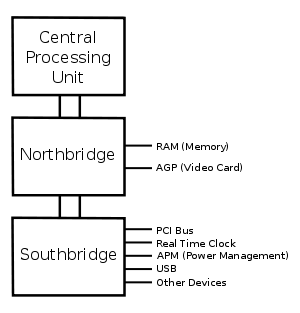
Diagram of the motherboard chipset

NORTHBRIDGE
  • The northbridge, also known as a memory controller hub (MCH) or an integrated memory controller (IMC) in Intel systems (AMD, VIA, SiS and others usually use 'northbridge'), is one of the two chips in the core logic chipset on a PC motherboard, the other being the southbridge.
  • Separating the chipset into the northbridge and southbridge is common, although there are rare instances where these two chips have been combined onto one die when design complexity and fabrication processes permit it.,
SOUTHBRIDGE
  • The Southbridge, also known as an I/O Controller Hub (ICH) or a Platform Controller Hub (PCH) in Intel systems (AMD, VIA, SiS and others usually use 'southbridge'), is a chip that implements the "slower" capabilities of the motherboard in a northbridge/southbridge chipset computer architecture.
  • The southbridge can usually be distinguished from the northbridge by not being directly connected to the CPU. Rather, the northbridge ties the southbridge to the CPU.
                                  explainpoin.blogspot.in
A typical north/southbridge layout

Chipset Characteristics

The characteristics of a chipset can be broken down into six categories: host, memory, interfaces, arbitration, south bridge support, and power management. Each of these categories defines and differentiates one chipset from another. The characteristics defined in each of these categories are as follows:

• Host This category defines the host processor to which the chipset is matched along with its bus voltage, usually GTL+ (Gunning Transceiver Logic Plus) or AGTL+ (Advanced Gunning Transceiver Logic Plus), and the number of processors the chipset will support.

• Memory This category defines the characteristics of the DRAM support included in the chipset, including the DRAM refresh technique supported, the amount of memory support (in megabits usually), the type of memory supported, and whether memory interleave, ECC (error correcting code), or parity is supported.
• Interfaces This category defines the type of PCI interface implemented and whether the chipset is AGP compliant, supports integrated graphics PIPE (pipelining), or SBA (side band addressing).

• Arbitration This category defines the method used by the chipset to arbitrate between different bus speeds and interfaces. The two most common arbitration methods are MTT (multi transaction timer) and DIA (dynamic intelligent arbiter).

• South bridge support All intel chipsets and most of the chipsets for all other manufacturers are two processor sets. In these sets the north bridge is the main chip and handles CPU and memory interfaces among other tasks, while the south bridge (or the second chip ) handles such things as the USB and IDE interfaces, the RTC (real time clock),and support for serial and parallel ports.

• Power management All intel chipsets support both the SMM (system management mode) and ACPI (advanced configuration and power interface power management standards).

Celeron Processor


Intel Celeron processor is the low-end (and low cost) member of the family of microprocessors from Intel that is based on its P6 architecture. Although it is based on the same architecture as the Pentium II, it lacks some high- performance features of the Pentium II line.
       Celeron models later than the 300. A include an L1 and L2 cache on the microchip, meaning that the cache is accessed at the same clock speed that the processor operates with. The Celeron L2 cache is smaller (128 kilobyte’s) than the Pentium II's (512 KB). However, because the Celeron L2 cache is on the processor chip and the Pentium II's is not, their effective L2 speeds are closely comparable. With clock speeds up to 466 MHz, Celeron processors are attractive to power users at first glance, but they should be compared to the Pentium II's computing power in order to get an idea of their useful application.
 
In ZDNet's CPU mark 99 benchmark tests, the Celeron processors compared favorably with Pentium II processors. Intel is marketing the processor as a chip for the basic PC. They view it as providing performance Good enough for home and business users doing word processing and Internet surfing. Power users and serious gamers may want to think about spending more for the Pentium II's top performance.

Celeron can be mounted in a Slot 1 motherboard or in a Socket 370 motherboard. Like Intel's other P6 microprocessors, the Celeron can be used for symmetric multiprocessing (SMP).


Complex Instruction Set Computer (CISC)


The Microprocessors using CISC architecture have many instruction built into it. This saves the processing time for performing tasks. The time is saved because the required instructions are available in the microprocessor itself and it does not have to retrieve the instruction from the program stored in the external memory, such as the RAM.

                            The CISC architecture helps the microprocessor to speed up the execution of programs requiring instruction. However, the instruction built into the microprocessor affects the performance of the microprocessor. This is because more time is taken to process the instruction and also the space available on the microprocessor for processing reduces. To overcome this problem, more transistors need to be built into the microprocessor to maintain the speed of microprocessor. This type of processor is useful for general purpose computing. It is generally used in personal computers (PCs).

   
                         ReducedInstruction Set Computer (RISC) :-


Cache levels


Caches that are used in computers are fast pools of memory that are designed to speed up the transfer of data between fast and slower devices. Aside from being used to buffer data, caches can possess software support logic, enabling them to begin processing procedures in advance.
Most of the modern computer  use two or three cache levels so that processor does not have to wait for longer time for information from the memory.

                 Different types of cache levels are:-

L1 Cache :-  L1 or Level 1 cache is referred to the cache which is built in the processor. This is the fastest cache in the computer. This cache is also known as primary cache or internal cache. The most common size of this type of cache memory is 8 KB to 64 KB.


L2 Cache :-  L2 or Level 2 cache was located outside the processor i.e. commonly present on the motherboard. The most common size of this type of cache memory is 64 KB to 8 KB. L2 cache can also reduce data access time by buffering the data that processor is about to request from memory, as well as program instructions. L2 cache is secondary to the CPU and is slower than L1 cache, despite often being much larger. In addition, data that is requested from L2 cache is copied to L1 cache. Requested data is removed from L2 cache if it is an exclusive cache, and stays there if it is an inclusive cache. L2 cache is most often unified, which means that it is used to store both program data and instructions.


L3 Cache :-   L3 or Level 3 cache all modern processor have L2 cache on them, thus the cache on the motherboard is referred to as L3 cache. Often only high end workstations and servers need L3 cache. Currently only the Pentium 4 Extreme Edition features L3 cache. L3 has been part of the CPU or externally mounted near the CPU on the motherboard. It comes in sizes and speeds.
            L3 cache is a memory cache that is built into the motherboard. It is used to feed the L2 cache, and is typically faster than the system's main memory, but still slower than the L2 cache.
  
  
Different Cache Levels